
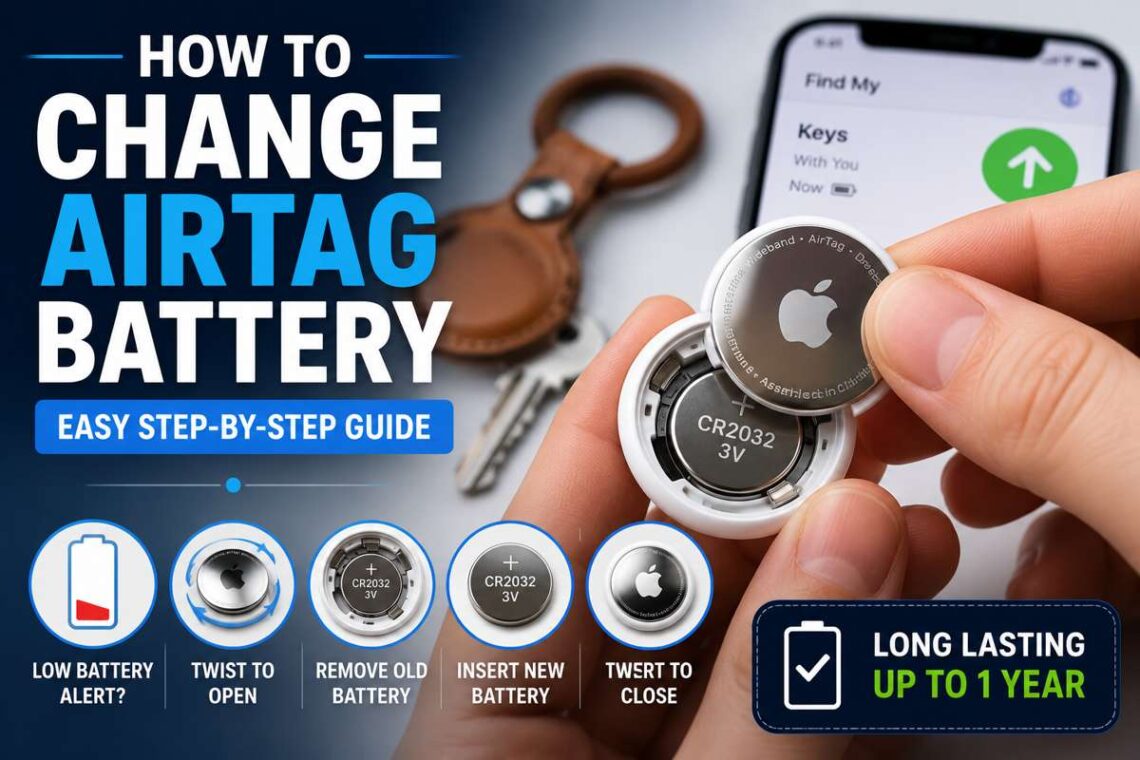
Apple AirTags are incredibly useful for keeping track of your everyday belongings, whether it’s your keys, backpack, luggage, or wallet. Designed to work seamlessly with the Find My network, they help you locate misplaced items quickly using your iPhone or iPad.
Unlike many rechargeable devices, AirTags use a replaceable coin-cell battery. The good news is that replacing it takes less than a minute and requires no special tools. If your AirTag has started showing a low battery warning, it’s time for a quick battery replacement.
In this guide, you’ll learn how to change AirTag battery safely, which battery type to buy, how to know when the battery is low, common mistakes to avoid, and tips to maximize battery life.
Why You May Need to Replace an AirTag Battery
An AirTag is powered by a CR2032 lithium coin battery that typically lasts around one year under normal use.
Eventually, the battery loses power, and your AirTag can no longer communicate with the Find My network. Fortunately, Apple designed AirTags so users can easily replace the battery instead of buying a new device.
Common reasons for replacing the battery include:
- Low battery notification on your iPhone
- AirTag no longer updates its location
- Reduced tracking performance
- Battery has reached the end of its lifespan
Replacing the battery restores normal functionality almost immediately.
How to Know When Your AirTag Battery Is Low
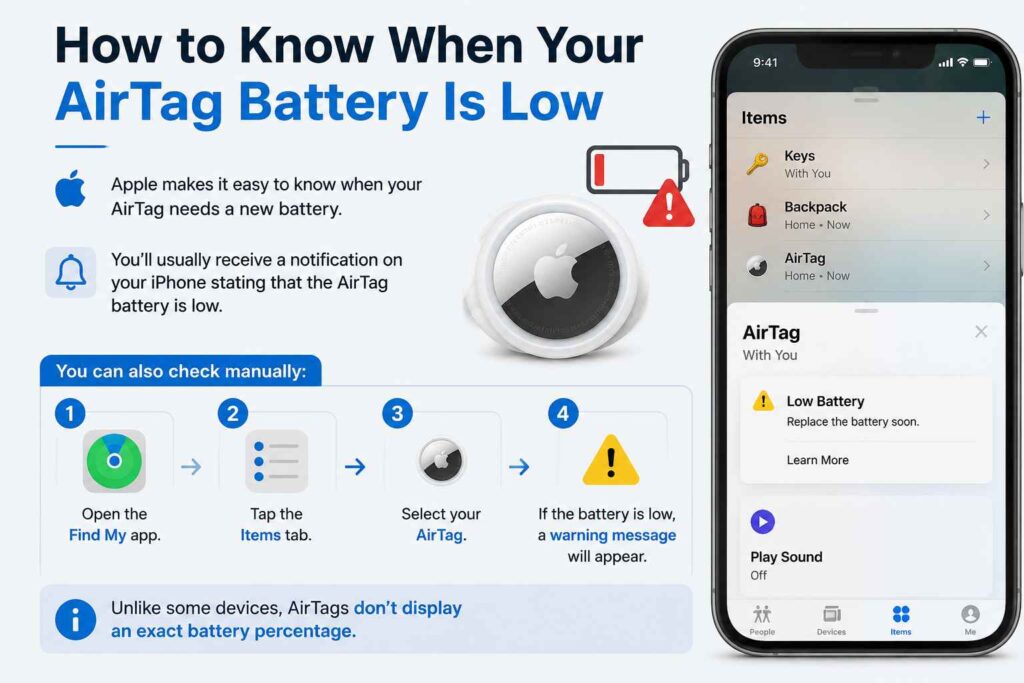
Apple makes it easy to know when your AirTag needs a new battery.
You’ll usually receive a notification on your iPhone stating that the AirTag battery is low.
You can also check manually:
- Open the Find My app.
- Tap the Items tab.
- Select your AirTag.
- If the battery is low, a warning message will appear.
Unlike some devices, AirTags don’t display an exact battery percentage.
What Battery Does an AirTag Use?
Apple AirTags use a standard CR2032 3V lithium coin battery.
These batteries are widely available in supermarkets, electronics stores, pharmacies, and online retailers.
When purchasing a replacement battery, keep these points in mind:
- Choose a high-quality brand.
- Make sure it is a CR2032 battery.
- Avoid rechargeable alternatives unless specifically designed for AirTags.
- Some CR2032 batteries have a bitter coating to discourage children from swallowing them. A few coated batteries may not work reliably in certain AirTags, so check compatibility if you experience issues.
Things You’ll Need
Before replacing the battery, gather the following:
- A new CR2032 lithium coin battery
- Your AirTag
- A clean, dry surface
No screwdriver or special tools are required.
Step-by-Step Guide to Replace the Battery
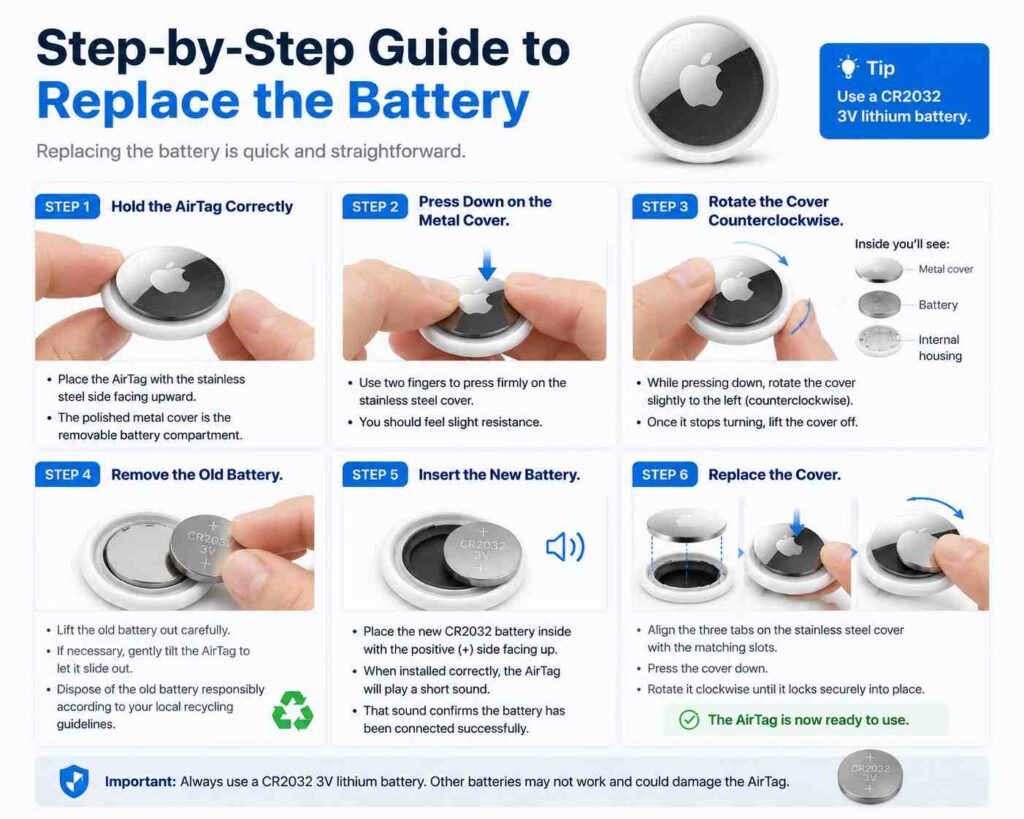
Replacing the battery is quick and straightforward.
Step 1: Hold the AirTag Correctly
Place the AirTag with the stainless steel side facing upward.
The polished metal cover is the removable battery compartment.
Step 2: Press Down on the Metal Cover
Use two fingers to press firmly on the stainless steel cover.
You should feel slight resistance.
Step 3: Rotate the Cover Counterclockwise
While pressing down, rotate the cover slightly to the left (counterclockwise).
Once it stops turning, lift the cover off.
Inside you’ll see:
- Metal cover
- Battery
- Internal housing
Step 4: Remove the Old Battery
Lift the old battery out carefully.
If necessary, gently tilt the AirTag to let it slide out.
Dispose of the old battery responsibly according to your local recycling guidelines.
Step 5: Insert the New Battery
Place the new CR2032 battery inside with the positive (+) side facing up.
When installed correctly, the AirTag will play a short sound.
That sound confirms the battery has been connected successfully.
Step 6: Replace the Cover
Align the three tabs on the stainless steel cover with the matching slots.
Press the cover down.
Rotate it clockwise until it locks securely into place.
The AirTag is now ready to use.
How to Confirm the Battery Is Working
After replacing the battery:
- Open the Find My app.
- Tap Items.
- Select your AirTag.
- Confirm there is no low battery warning.
You can also tap Play Sound to verify that the AirTag responds correctly.
How Long Does an AirTag Battery Last?
Under typical daily use, a CR2032 battery lasts approximately one year.
Battery life depends on factors such as:
- Frequency of location updates
- How often you use Precision Finding
- Number of times the AirTag plays sounds
- Environmental conditions
- Overall usage
Heavy use may shorten battery life slightly.
Tips to Make the Battery Last Longer
Although the battery is inexpensive, extending its lifespan is always beneficial.
Consider these tips:
- Avoid repeatedly playing the AirTag sound unnecessarily.
- Keep the AirTag clean and dry.
- Store unused AirTags in a moderate-temperature environment.
- Use quality batteries from reputable manufacturers.
- Replace the battery as soon as you receive a low battery alert.
Common Problems After Replacing the Battery
Occasionally, an AirTag may not work immediately after installing a new battery.
Here are a few possible solutions.
The AirTag Doesn’t Make a Sound
Remove the battery and reinstall it.
Make sure the positive (+) side faces upward.
Low Battery Warning Still Appears
Wait a few minutes for the Find My app to refresh.
If the warning remains, try another new CR2032 battery.
AirTag Isn’t Showing in Find My
Ensure Bluetooth is enabled.
Move closer to your iPhone.
Restart your iPhone if necessary.
Battery Doesn’t Fit Properly
Verify you’re using a standard CR2032 battery.
Other coin-cell batteries may look similar but have different dimensions.
Safety Tips When Replacing an AirTag Battery
Coin-cell batteries can be dangerous if swallowed.
Always:
- Keep batteries away from children and pets.
- Recycle used batteries properly.
- Never puncture or burn lithium batteries.
- Store spare batteries in their original packaging.
- Wash your hands after handling damaged batteries.
Following these precautions helps prevent accidents.
Can You Recharge an AirTag Battery?
No.
AirTags are not rechargeable.
Once the CR2032 battery runs out, simply replace it with a new one.
Trying to recharge a disposable lithium coin battery is unsafe and should never be attempted.
Should You Replace the AirTag Instead?
In most cases, replacing the battery is all that’s needed.
You generally do not need to buy a new AirTag unless:
- The device is physically damaged.
- It has water damage beyond normal resistance.
- Internal hardware has failed.
- It no longer connects after troubleshooting.
A battery replacement costs only a fraction of buying a new AirTag.
Final Thoughts
Learning how to change AirTag battery is one of the easiest maintenance tasks for any Apple accessory. The process takes only a minute, requires no tools, and helps keep your AirTag working reliably for another year. By using a compatible CR2032 battery and following the correct installation steps, you can quickly restore full tracking functionality and continue protecting your important belongings without interruption.
FAQs
1. What battery does an Apple AirTag use?
An Apple AirTag uses a standard CR2032 3V lithium coin battery.
2. How often should I replace my AirTag battery?
Most users need to replace it about once every year, depending on usage.
3. Do I need tools to replace the battery?
No. The battery compartment opens by pressing and twisting the metal cover by hand.
4. Why didn’t my AirTag make a sound after installing a new battery?
Check that the battery is installed with the positive (+) side facing upward and that it is making proper contact.
5. Can I recharge an AirTag battery?
No. AirTags use replaceable CR2032 batteries and are not designed for rechargeable batteries.




One comment on “How to Change AirTag Battery: A Complete Step-by-Step Guide”